Frequently Asked Questions

Select Your Model

All Questions

If dried bio-waste is stuck to the Bucket, soak in warm soapy water to remove. While the Bucket can be cleaned in the dishwasher, doing so may reduce its lifespan. If the Bucket is jammed due to bio-waste coagulating along the bucket interior and blades, we recommend pouring in boiling water and letting the Bucket contents soak before attempting to remove the blockage. Any residue stuck to the bucket is caused by the oil/grease or moisture content of the unit cycle. For an all-natural clean, try cycling citrus peels by themselves! This will also help to eliminate any trapped odours in the unit’s ventilation system.

It’s normal to notice some dried bio-waste debris stuck to the sides or bottom of your bucket after a cycle.

Tip: dry by-product can actually serve as a beneficial “dry mix” addition for the next cycle. As long as the grinding blade can fully rotate after emptying the Bucket, you can proceed to fill it for the next cycle.

CAUTION: Do not reach your hand into the FoodCycler® Eco 3™ Bucket, as the blades are extremely sharp.

Each cycle consumes an average of 0.9 kWh per cycle, which is roughly equivalent to having a desktop computer running for the same amount of time as the cycle.

The FoodCycler® has built-in sensor technology that monitors the dryness and humidity of the bio-waste. Once complete, the unit will stop the cycle automatically.

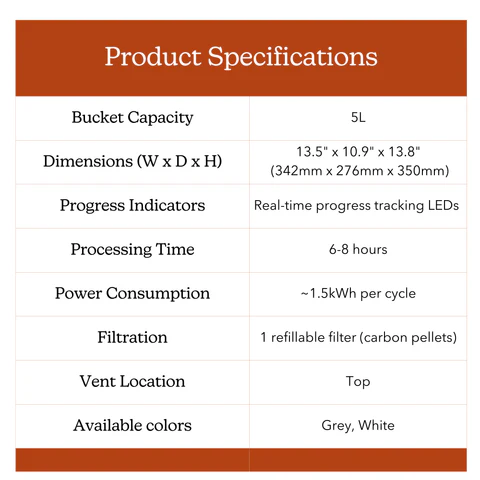
FoodCycler® Eco 5™
Bucket capacity: 5 L
Dimensions (mm): 342(W) x 276(D) x 350(H)
Weight: 13.6 kg
Progress Indicators: real-time progress tracking LEDs
Processing Time: 4–9 hours
Power Consumption: ~1.5kWh per cycle
Filtration: 1 refillable filter
Vent Location: Top
Bio-waste reduction: up to 90%
Colour options: grey | white

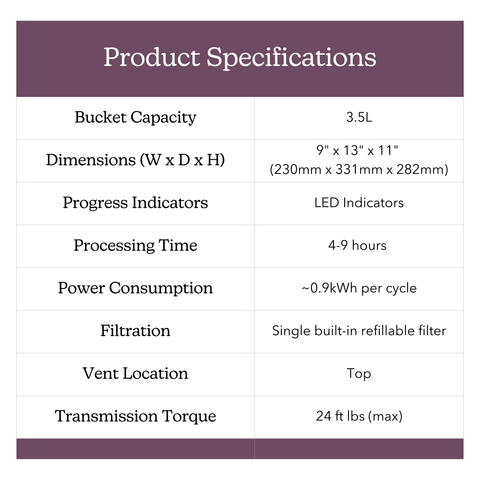
FoodCycler® Eco 3™
Bucket capacity: 3.5 L
Dimensions (mm): 230(W) x 331(D) x 282(H)
Weight: 10.2 kg
Progress Indicators: 4-Phase LED
Processing Time: 4–9 hours
Power Consumption: ~0.9kWh per cycle
Filtration: 1 refillable filter
Vent Location: Top
Bio-waste reduction: up to 90%
Colour options: grey | white

After you replace your carbon filter pellets, press and hold the Power button for 3 seconds, release, and then hold again for another 3 seconds until you hear an audible tone to reset the Carbon Filter Replacement reminder.

This is normal! The unit could be emitting an odour for a variety of reasons.
The carbon filtration systems in each FoodCycler® are required to ensure a near-odourless cycle. The filters last approximately 500 cycle hours, or 3-4 months with regular use.

Even if the ‘Replace Filter’ light has not gone on yet, you may need to switch out your carbon pellets. Similarly, you can continue cycling even if the filter light has gone on and no odours are apparent.

Filter life is determined by the moisture quantity in the food waste, and the the intensity of odours of each cycle. If you are cycling rotten, smelly or potent food wastes (such as rotten meat, fish or old cheese) your filters may not last as long as if you were cycling simple veggie scraps and coffee grounds.

Tip: Running a cycle of mostly citrus peels will not only help keep your Bucket clean, it also eliminates any trapped odours in the unit’s ventilation system

The FoodCycler® bio-waste waste recycler greatly reduces bio-waste volume, odors, liquids, bacteria and methane gasses that would otherwise be generated by putting your food waste in the trash.

The FoodCycler uses a multi-phase cycle which aerates and pulverizes food waste to a fine, dry, odourless powder which can be used in gardening applications.

3.5L
We recommend keeping the contents below the indicator line level to avoid jams. For more information, visit the Eco 3 product page!

Yes, you can add additional bio-waste to the FoodCycler® Eco 3™ once the cycle has already begun. For best results, and to avoid extending the cycle period, we recommend adding bio-waste early in the cycle- or within the first hour and a half of cycling. Adding bio-waste midway through the cycle may result in unprocessed bio-waste at the end of the cycle, as this extends the dehydration and grinding process. If this occurs, we recommend starting a second cycle until the bio-waste has been completely broken down.

Yes, the FoodCycler® Eco 3™ can process fish, chicken, pork, lamb and other small bones. Large bones can cause jams or damage all units’ Bucket grinding gears.

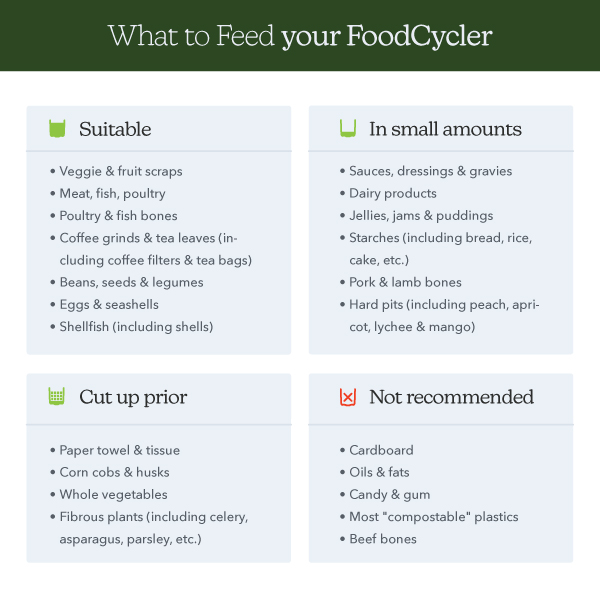
The chart below show the “Do’s & Don’ts” of FoodCycling – for more information, visit the Eco 3™ Product Page!

There are often 2 reasons the bucket will be stuck in your machine:
1. If the machine was opened or lost power during a cycle the gears may be in a position where they are holding the bucket in place.

If your bucket is empty or the arm still turns, try letting the machine run for 5 minutes to realign then try removing the bucket again.

2. The second reason is where the food has hardened leaving something the machine can’t turn which locks the bucket on the gears.

If this is the case, try this:
– Add boiling water, mild dish soap, and baking soda to the bucket until half full. Let it sit.
– After a few minutes, see if the bucket can lift or wiggle out. If not, leave it to soak longer. You can use a wooden spoon or other utensil to help remove hardened food.
– If you manage to remove the bucket, clean it and try running your FoodCycler again. If not, close the lid and start a cycle. The motor can help move the blades and clear hardened food.

Let’s try a reset to see if that fixes the problem:

  • Ensure that the lid is closed and is locked using the lid latch.
  • If the unit is running, press down on the Power button LED on the touchscreen for upwards of 3 seconds until you hear one long beep and the unit shuts down. Release your finger from the button
  • Unplug the unit and wait 2 minutes.
  • Plug the unit back in & leave it for 30 seconds
  • Press the Power button LED on the touchscreen (press and release the power button once, if nothing happens, press and release the power button a second time).

If the issue persists, please send a short video showing the process and what happens afterward. This will help us diagnose the issue better.

Error codes

Prior to seeking customer support, we recommend that customers try a few troubleshooting steps on their own. 

.

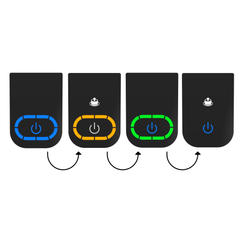
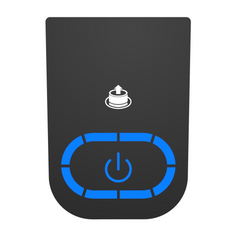
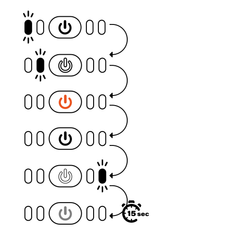
This code sequence occurs at the beginning of your cycle. No action is required – your unit is running normally!

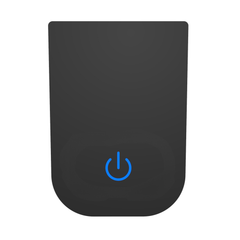
This indicates that your unit is plugged in. No action required.

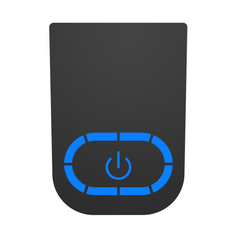
Blue lights along the LED track indicate that the unit is running a cycle: the LED track displays cycle progress. No action required.

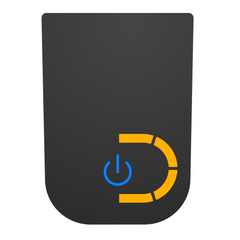
This sensor indicates that your Carbon Filter pellets are ready to be replaced OR that 500 cycle hours have elapsed since you last reset you filters. If the sensor goes off, but you are not experiencing odors, you may continue to run your unit as usual. The Change Filter light is merely an indicator that 500 cycle hours have elapsed.

This sensor indicates that your unit is experiencing temperatures which are either too high or too low for it to run efficiently (within 0°-60° C (32º-140º F). Try moving the unit to a room-temperature environment and attempt to run another cycle. If the error code persists, please contact Customer Support at support@foodcycler.com.

This sensor indicates that your unit is experiencing a motor overload. If this is caused by a blockage in the Bucket, try the following steps: 1) If the Bucket is jammed due to food waste coagulating along the Bucket interior and blades, we recommend pouring boiling water into the bucket and letting the Bucket contents soak for about 10 minutes. 2) Attempt to dislodge the blockage with a tool or kitchen implement (the Bucket blades are extremely sharp). If the error code persists, please contact Customer Support.

Let’s try a reset to see if that fixes the problem:

  • Push and hold the on/off button for 4 seconds
  • Push again for another 4 seconds
  • On/Off button will flash orange, will beep 3 times and then turn off

If the issue persists, please send a short video showing the process and what happens afterward.

Error codes

Prior to seeking customer support, we recommend that customers try a few troubleshooting steps on their own. 

This code sequence occurs at the beginning of your cycle. No action is required – your unit is running normally!

This sensor indicates that your Carbon Filter pellets are ready to be replaced OR that 500 cycle hours have elapsed since you last reset your filters. If the sensor goes off, but you are not experiencing odours, you may continue to run your unit as usual. The Change Filter light is merely an indicator that 500 cycle hours have elapsed.

This sensor indicates that your unit is experiencing temperatures which are either too high or too low for it to run efficiently (within 0°-60° C (32º-140º F). Try moving the unit to a room-temperature environment and attempt to run another cycle. If the error code persists, please contact Customer Support at support@foodcycler.com.

This sensor indicates that your unit is experiencing a motor overload. If this is caused by a blockage in the Bucket, try the following steps: 1) If the Bucket is jammed due to food waste coagulating along the Bucket interior and blades, we recommend pouring boiling water into the bucket and letting the Bucket contents soak for about 10 minutes. 2) Attempt to dislodge the blockage with a tool or kitchen implement (CAUTION: do not use your hands to dislodge the blockage as the Bucket blades are extremely sharp and may cause injury). If the error code persists, please contact Customer Support.

All FoodCycler® units will complete a cycle within approximately 4-9 hours.
The time needed depends on the amount of bio-waste being processed, the density of the bio-wastes and the moisture levels contained in each.

The Vortech™ grinding system utilizes a multi-blade steel rotary system that effectively pulverizes a wide variety of soft and hard bio-waste scraps, transforming them into smaller, dried granules. The flow stream that powers the turning system, pushes the bio-waste into walls of the container, breaking down and squeezing the pulp further to the bottom, while removing moisture, processing the matter into a fine dry substance. The resulting by-product contains rich nutrients that can be added to soil as an amendment for gardening uses.

The carbon filters last between 3-4 months with regular use, or 500 cycle hours. The life expectancy of the carbon filters is determined by the moisture content of the bio-waste, and the natural odours of the bio-waste. Denser, wetter and smellier bio-waste will go through filters much faster than simple veggie scraps and egg shells.

FoodCycler® products use a refillable filter system, which means that you can keep using your filters indefinitely and simply replace the carbon itself when they are ready to be changed. The filter carbon is a harmless organic material, and can be safely disposed of in your regular trash or organics collection bin. Please follow your municipal waste guidelines in disposing of your used carbon. Buckets can be recycled through your local metal scrap collection service.

Your by-product can be safely stored after your cycle in a closed container safe from moisture until you are ready to use it!

Foodilizer is a light, dry, nearly bacteria-free nutrient-rich soil amendment which can be used in gardening applications.

Whether you’re growing your own garden, supporting your community, or managing waste responsibly. Here are some great ways to make the most of it:

  • Feed your garden – If you have a garden or grow your food, you can use the Foodilizer as a supplement to soil amendment products. The Foodilizer is also safe to store for future use.
  • Give it to others – Donate your Foodilizer to local farmers, community gardens, or garden centres.
  • Add it to your compost – Mix your Foodlizer with compost to improve microbial activity and nutrient retention.
  • Keep it green – Add it to your bio-waste bin or compost haul. Your current trash hauler can pick it and use.

Methane gas is emitted during the decomposition process of organic materials in an anaerobic (“no air”) environment. Methane is 28 times more insulative of atmospheric heat than CO₂, and is therefore a huge contributing force to global climate change. Since the FoodCycler® aerates the bio-waste while heating and pulverizing (an aerobic environment), those environmentally damaging methane gases are not produced during the cycle.

The FoodCycler® bio-waste recycler greatly reduces food waste volume, odors, liquids, bacteria and eliminates methane gasses that would otherwise be generated by putting your bio-waste in the trash.

The FoodCycler uses a multi-phase cycle, which aerates and pulverizes bio-waste to a fine, dry, odourless powder which can be used in gardening applications.

When inserting your Bucket:

  1. Hold onto the Bucket handle tightly.
  2. Insert the Bucket into the unit cavity.
  3. Rotate the Bucket to the right or left until it drops into place, and sits level with the top of the FoodCycler opening.
  4. If the Bucket does not sit flush in the unit, twist the Bucket slightly in small rotations of up to 60° in each direction until it seats correctly.

For all other unit inquiries, please contact Customer Support.

Once the unit beeps and/or shuts off following a cycle, the Bucket is safe to handle – though may still be quite warm. Please exercise caution when handling the Bucket directly after a cycle.

Yes you can! Like most appliances, the FoodCycler® is not intended to function in below-freezing temperatures. The FoodCycler® must be in a closed, dry environment where there is no risk of it being rained on or otherwise subjected to the elements.

If dried bio-waste is stuck to the Bucket, soak in warm soapy water to remove. While the Bucket can be cleaned in the dishwasher, doing so may reduce its lifespan. If the Bucket is jammed due to bio-waste coagulating along the Bucket interior and blades, we recommend pouring in boiling water and letting the Bucket contents soak before attempting to remove the blockage. Any residue stuck to the Bucket is caused by the oil/grease or moisture content of the unit cycle. For an all-natural clean, try cycling citrus peels by themselves! This will also help to eliminate any trapped odours in the unit’s ventilation system.

It’s normal to notice some dried bio-waste stuck to the sides or bottom of your Bucket after a cycle.

Tip: dry by-product can actually serve as a beneficial “dry mix” addition for the next cycle. As long as the grinding blade can fully rotate after emptying the Bucket, you can proceed to fill it for the next cycle.

CAUTION: Do not reach your hand into the FoodCycler® Eco 5™ Bucket, as the blades are extremely sharp.

Each cycle consumes an average of 1.5 kWh per cycle, which is roughly equivalent to having a desktop computer running for the same amount of time as the cycle. Depending on where you live, each cycle should not cost you more than a couple of cents.

The FoodCycler® has built-in sensor technology that monitors the dryness and humidity of the bio-waste. Once complete, the unit will stop the cycle automatically.

After you replace your carbon filter pellets, press and hold the Power button for 3 seconds, release, and then hold again for another 3 seconds until you hear an audible tone to reset the Carbon Filter Replacement reminder.

This is normal! The unit could be emitting an odour for a variety of reasons.
The carbon filtration systems in each FoodCycler® are required to ensure a near-odourless cycle. They last approximately 500 cycle hours, or 3-4 months with regular use.

Even if the ‘Replace Filter’ light has not gone on yet, you may need to switch out your filter carbon. Similarly, you can continue cycling even if the filter light has gone on and no odours are apparent.

Filter life is determined by the moisture quantity in the bio-waste, and the intensity of odours of each cycle. If you are cycling rotten, smelly or potent bio-waste (such as rotten meat, fish or old cheese) your filters may not last as long as if you were cycling simple veggie scraps and coffee grounds.

Tip: Running a cycle of mostly citrus peels will not only help keep your Bucket clean, it also eliminates any trapped odours in the unit’s ventilation system.

The FoodCycler® bio-waste recycler greatly reduces food waste volume, odors, liquids, bacteria and methane gasses that would otherwise be generated by putting your bio-waste in the trash.

The FoodCycler uses a multi-phase cycle which aerates and pulverizes bio-waste to a fine, dry, odourless powder which can be used in gardening applications.

5L
We recommend keeping the contents below the indicator line level to avoid jams. For more information, visit the Eco 5 product page!

Yes, you can add additional bio-waste to the FoodCycler® Eco 5™ once the cycle has already begun. For best results, and to avoid extending the cycle period, we recommend adding bio-waste early in the cycle- or within the first hour and a half of cycling. Adding bio-waste midway through the cycle may result in unprocessed food waste at the end of the cycle, as this extends the dehydration and grinding process. If this occurs, we recommend starting a second cycle until the bio-waste has been completely broken down.

Yes, the FoodCycler® Eco 5™ can process fish, chicken, pork, lamb and other small bones. Large bones can cause jams or damage all units’ Bucket grinding gears.

The chart below show the “Do’s & Don’ts” of FoodCycling – for more information, visit the Eco 5™ Product Page!

Methane gas is emitted during the decomposition process of organic materials in an anaerobic (“no air”) environment. Methane is 30 times more insulative of atmospheric heat than CO₂, and is therefore a huge contributing force to global climate change. Since the FoodCycler® aerates the bio-waste while heating and pulverizing (an aerobic environment), those environmentally damaging methane gases are not produced at all.

Your by-product can be stored after your cycle in an open-air container for a period of one week. After this one-week period, you can store the by-product for up to a year in a closed-top container, if preferred.

In the Eco 3™ FoodCycler® and Eco 5™ FoodCycler®, a typical cycle takes between 4-9 hours for the bio-waste to become completely dehydrated and processed into the by-product.

The time needed depends on the amount of bio-waste being processed, the density of the food wastes and the moisture levels contained in each. Please note that these estimates exclude the unit’s cooling time which lasts less than a half hour on average.

We advise that you keep the lid closed til the cycle is complete to prevent the cycle from being prematurely or improperly finished, or from lasting longer than usual. The only exception is if you add more bio-waste to the unit while it is recycling, but we strongly recommend that you take care when opening the lid mid-cycle as the bio-waste and bucket get very hot during the process so it is strongly recommended to keep the lid shut.

The carbon filters last between 3-4 months with regular use, or 500 cycle hours. The life expectancy of the carbon filters is determined by the moisture content of the bio-waste, and the natural odours of the food waste. Denser, wetter and smellier bio-waste will go through filters much faster than simple veggie scraps and egg shells.

Once the unit beeps and/or shuts off following a cycle, the Bucket is safe to handle – though may still be quite warm. Please exercise caution when handling the bucket directly after a cycle.

The drying phase is focused on removing moisture from your bio-waste.

The grinding phase continues the drying process, removing any remaining moisture, while the bucket grinding blades agitate and pulverize the bio-waste.

The cooling phase is a safety measure to return the processed bio-waste to near-room temperature, making it safe to handle. Power usage is minimal during the cooling phase.

*PLEASE DO NOT SKIP THE COOLING CYCLE. It is for your safety and for the safe handling of your FoodCycler® and grinding Bucket.

Question about the Eco 3

If dried food waste is stuck to the Bucket, soak in warm soapy water to remove. While the Bucket can be cleaned in the dishwasher, doing so may reduce its lifespan. If the Bucket is jammed due to food waste coagulating along the bucket interior and blades, we recommend pouring in boiling water and letting the Bucket contents soak before attempting to remove the blockage. Any residue stuck to the bucket is caused by the oil/grease or moisture content of the unit cycle. For an all-natural clean, try cycling citrus peels by themselves! This will also help to eliminate any trapped odours in the unit’s ventilation system.

It’s normal to notice some dried food debris stuck to the sides or bottom of your bucket after a cycle.

Tip: dry by-product can actually serve as a beneficial “dry mix” addition for the next cycle. As long as the grinding blade can fully rotate after emptying the Bucket, you can proceed to fill it for the next cycle.

CAUTION: Do not reach your hand into the FoodCycler® Eco 3™ Bucket, as the blades are extremely sharp.

Each cycle consumes an average of 0.9 kWh per cycle, which is roughly equivalent to having a desktop computer running for the same amount of time as the cycle. Depending on where you live, each cycle should not cost you more than a couple of cents.

The FoodCycler® has built-in sensor technology that monitors the dryness and humidity of the food waste. Once complete, the unit will stop the cycle automatically.

After you replace your carbon filter pellets, press and hold the Power button for 3 seconds, release, and then hold again for another 3 seconds until you hear an audible tone to reset the Carbon Filter Replacement reminder.

This is normal! The unit could be emitting an odour for a variety of reasons.
The carbon filtration systems in each FoodCycler® are required to ensure a near-odourless cycle. The filters last approximately 500 cycle hours, or 3-4 months with regular use.

Even if the ‘Replace Filter’ light has not gone on yet, you may need to switch out your carbon pellets. Similarly, you can continue cycling even if the filter light has gone on and no odours are apparent.

Filter life is determined by the moisture quantity in the food waste, and the the intensity of odours of each cycle. If you are cycling rotten, smelly or potent food wastes (such as rotten meat, fish or old cheese) your filters may not last as long as if you were cycling simple veggie scraps and coffee grounds.

Tip: Running a cycle of mostly citrus peels will not only help keep your Bucket clean, it also eliminates any trapped odours in the unit’s ventilation system.


The FoodCycler® food waste recycler greatly reduces food waste volume, odors, liquids, bacteria and methane gasses that would otherwise be generated by putting your food waste in the trash.

The FoodCycler uses a multi-phase cycle which aerates and pulverizes food waste to a fine, dry, odourless powder which can be used in gardening applications.

For more details, visit our How It Works page!

3.5L (0.9 gallons)
We recommend keeping the contents below the indicator line level to avoid jams. For more information, visit the Eco 3 product page!

Yes, you can add additional food waste to the FoodCycler® Eco 3™ once the cycle has already begun. For best results, and to avoid extending the cycle period, we recommend adding food waste early in the cycle- or within the first hour and a half of cycling. Adding food waste midway through the cycle may result in unprocessed food waste at the end of the cycle, as this extends the dehydration and grinding process. If this occurs, we recommend starting a second cycle until the food waste has been completely broken down.

Yes, the FoodCycler® Eco 3™ can process fish, chicken, pork, lamb and other small bones. Large bones can cause jams or damage all units’ Bucket grinding gears.

The chart below show the “Do’s & Don’ts” of FoodCycling – for more information, visit the Eco 3™ Product Page!

Question about the Eco 5

Stuck Bucket : Open the unit.
Secure the lid to the locked position and press Start. Let the unit run for 10-20 seconds, or until you can hear the grinding arms start to turn. You can pause the cycle by opening the unit lid, and try removing the Bucket.
If unsuccessful, check the food content. Is it a solid mass? If so, proceed to step 3. If not,
You may need to loosen the by-product inside the Bucket. Unplug your unit, add boiling water to the Bucket, enough to submerge the solid contents. Let the Bucket sit for a period of approximately 10 minutes. Using a long plastic or wooden utensil, attempt to shift the Bucket contents so as to free the blockage from the grinding arm. Run the cycle again for 10-20 seconds, and try again to remove the Bucket.

Prior to seeking customer support, we recommend that customers try a few troubleshooting steps on their own. Please reference the Error Codes document below. If your unit is displaying codes 1-6, please read the section(s) below respective to the code you’re seeing. For codes 7-12, please reach out to Customer Support directly at support@foodcycler.com so that we can assist you further.

This code sequence occurs at the beginning of your cycle. No action is required – your unit is running normally!

This indicates that your unit is plugged in. No action required.

Blue lights along the LED track indicate that the unit is running a cycle: the LED track displays cycle progress. No action required.

This sensor indicates that your Carbon Filter pellets are ready to be replaced OR that 500 cycle hours have elapsed since you last reset you filters. If the sensor goes off, but you are not experiencing odors, you may continue to run your unit as usual. The Change Filter light is merely an indicator that 500 cycle hours have elapsed.

This sensor indicates that your unit is experiencing temperatures which are either too high or too low for it to run efficiently (within 0°-60° C (32º-140º F). Try moving the unit to a room-temperature environment and attempt to run another cycle. If the error code persists, please contact Customer Support at support@foodcycler.com.

This sensor indicates that your unit is experiencing a motor overload. If this is caused by a blockage in the Bucket, try the following steps: 1) If the Bucket is jammed due to food waste coagulating along the Bucket interior and blades, we recommend pouring boiling water into the bucket and letting the Bucket contents soak for about 10 minutes. 2) Attempt to dislodge the blockage with a tool or kitchen implement (the Bucket blades are extremely sharp). If the error code persists, please contact Customer Support at support@foodcycler.com.

Prior to seeking customer support, we recommend that customers try a few troubleshooting steps on their own. Please reference the Error Codes document below. If your unit is displaying codes 1-4, please read the section(s) below respective to the code you’re seeing. For codes 5-11, please reach out to Customer Support directly at support@foodcycler.com so that we can assist you further. 

This code sequence occurs at the beginning of your cycle. No action is required – your unit is running normally!

This sensor indicates that your Carbon Filter pellets are ready to be replaced OR that 500 cycle hours have elapsed since you last reset your filters. If the sensor goes off, but you are not experiencing odours, you may continue to run your unit as usual. The Change Filter light is merely an indicator that 500 cycle hours have elapsed.

This sensor indicates that your unit is experiencing temperatures which are either too high or too low for it to run efficiently (within 0°-60° C (32º-140º F). Try moving the unit to a room-temperature environment and attempt to run another cycle. If the error code persists, please contact Customer Support at support@foodcycler.com.

This sensor indicates that your unit is experiencing a motor overload. If this is caused by a blockage in the Bucket, try the following steps: 1) If the Bucket is jammed due to food waste coagulating along the Bucket interior and blades, we recommend pouring boiling water into the bucket and letting the Bucket contents soak for about 10 minutes. 2) Attempt to dislodge the blockage with a tool or kitchen implement (CAUTION: do not use your hands to dislodge the blockage as the Bucket blades are extremely sharp and may cause injury). If the error code persists, please contact Customer Support at support@foodcycler.com.

If dried food waste is stuck to the Bucket, soak in warm soapy water to remove. While the Bucket can be cleaned in the dishwasher, doing so may reduce its lifespan. If the Bucket is jammed due to food waste coagulating along the Bucket interior and blades, we recommend pouring in boiling water and letting the Bucket contents soak before attempting to remove the blockage. Any residue stuck to the Bucket is caused by the oil/grease or moisture content of the unit cycle. For an all-natural clean, try cycling citrus peels by themselves! This will also help to eliminate any trapped odours in the unit’s ventilation system.

It’s normal to notice some dried food debris stuck to the sides or bottom of your Bucket after a cycle.

Tip: dry by-product can actually serve as a beneficial “dry mix” addition for the next cycle. As long as the grinding blade can fully rotate after emptying the Bucket, you can proceed to fill it for the next cycle.

CAUTION: Do not reach your hand into the FoodCycler® Eco 5™ Bucket, as the blades are extremely sharp.

Each cycle consumes an average of 1.5 kWh per cycle, which is roughly equivalent to having a desktop computer running for the same amount of time as the cycle. Depending on where you live, each cycle should not cost you more than a couple of cents.

The FoodCycler® has built-in sensor technology that monitors the dryness and humidity of the food waste. Once complete, the unit will stop the cycle automatically.

Each cycle consumes an average of 1.5 kWh per cycle, which is roughly equivalent to having a desktop computer running for the same amount of time as the cycle. Depending on where you live, each cycle should not cost you more than a couple of cents.

The FoodCycler® has built-in sensor technology that monitors the dryness and humidity of the food waste. Once complete, the unit will stop the cycle automatically.

After you replace your carbon filter pellets, press and hold the Power button for 3 seconds, release, and then hold again for another 3 seconds until you hear an audible tone to reset the Carbon Filter Replacement reminder.

This is normal! The unit could be emitting an odour for a variety of reasons.
The carbon filtration systems in each FoodCycler® are required to ensure a near-odourless cycle. They last approximately 500 cycle hours, or 3-4 months with regular use.

Even if the ‘Replace Filter’ light has not gone on yet, you may need to switch out your filter carbon. Similarly, you can continue cycling even if the filter light has gone on and no odours are apparent.

Filter life is determined by the moisture quantity in the food waste, and the intensity of odours of each cycle. If you are cycling rotten, smelly or potent food wastes (such as rotten meat, fish or old cheese) your filters may not last as long as if you were cycling simple veggie scraps and coffee grounds.

Tip: Running a cycle of mostly citrus peels will not only help keep your Bucket clean, it also eliminates any trapped odours in the unit’s ventilation system.

The FoodCycler® food waste recycler greatly reduces food waste volume, odors, liquids, bacteria and methane gasses that would otherwise be generated by putting your food waste in the trash.

The FoodCycler uses a multi-phase cycle which aerates and pulverizes food waste to a fine, dry, odourless powder which can be used in gardening applications.

For more details, visit our How It Works page!

5L (1.3 gallons)
We recommend keeping the contents below the indicator line level to avoid jams. For more information, visit the Eco 5 product page!


Yes, you can add additional food waste to the FoodCycler® Eco 5™ once the cycle has already begun. For best results, and to avoid extending the cycle period, we recommend adding food waste early in the cycle- or within the first hour and a half of cycling. Adding food waste midway through the cycle may result in unprocessed food waste at the end of the cycle, as this extends the dehydration and grinding process. If this occurs, we recommend starting a second cycle until the food waste has been completely broken down.

Yes, the FoodCycler® Eco 5™ can process fish, chicken, pork, lamb and other small bones. Large bones can cause jams or damage all units’ Bucket grinding gears.

The chart below show the “Do’s & Don’ts” of FoodCycling – for more information, visit the Eco 5™ Product Page!